
How to remove leaked content from Google
By the Luveo team · Updated
Someone copied your photos, videos or artwork, posted them on another site, and now that site shows up when people search your name. It might be paid content from OnlyFans, Patreon, Fansly, Fanvue or another subscription platform, an influencer's photos, or an Instagram comic.
This guide walks through the Google forms that remove those results, what each asks for, and what removal can't do. Then it covers the other half: getting the copy off the site that hosts it.
The short version
- For content you created, the route that usually fits is a copyright (DMCA) removal request for Google Search, filed through Google's Report content on Google flow.
- Google removes the search result, not the file. The page stays online.
- Google reviews only the URLs you list, so list the exact pages.
- To get the file itself deleted, send a DMCA notice to the site's hosting provider.
Which Google route fits your leaked content?
Google has two separate removal paths that can apply to explicit content.
Copyright (a legal request). If you shot the photos or videos or drew the artwork yourself, you own the copyright, and the leak site copied them without your permission. That is what the copyright route is for. Google says it is its policy "to comply with notices of copyright infringement pursuant to the Digital Millennium Copyright Act."
Check who shot the content first. Google's flow warns that copyright in an image or video "is generally owned by the photographer/videographer," so the person in it may not be the owner "unless the image/video is a selfie or the subject has obtained the rights from the person who created it." If a photographer or partner filmed it, get the rights transferred to you in writing, or ask them to file the request.
Personal sexual content (a policy request). Google's "Remove personal sexual content from Google Search" policy covers real or fake sexual imagery of you. For content you agreed to, though, Google lists it only when "the content isn't commercialized online or somewhere else." Content you sell is commercialized, so this route often won't fit a leak of your paid posts. It does fit imagery or acts you didn't consent to, and fake imagery.
You can use both. Google's policy form says you "may report the same content through both legal and content/product policy reporting paths, but you must file each report separately," and a policy report "does not serve as legal notice."
Route 1: File a copyright removal request for Google Search
Before you start
Gather four things:
- The URLs of the leak pages. Open each page and copy the address from your browser, or right-click the blue title of a Google result and copy the link address. Don't submit the address of Google's results page or a site's home page. Google asks for the specific page.
- A description of your original work. Say which photo set or video it is and when you published it.
- A link to where you published it. The form asks "Where can we see an authorized example of the work?" Google uses it to check that your work appears on the pages you report. Your post or profile page on your subscription platform works. If the work isn't viewable online, say so in the form.
- A decision on whose name goes on the notice. See "Your name and the Lumen database" below.
Step by step
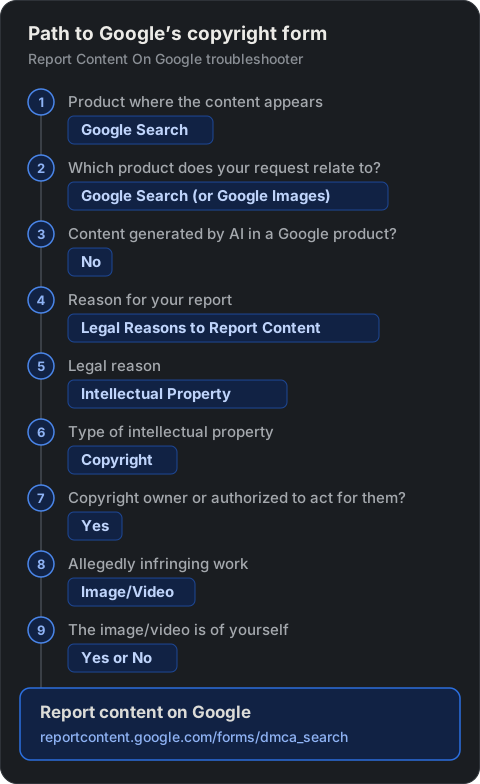
- Open Google's Report Content On Google troubleshooter. You can also start from Google's Report Content for Legal Reasons page and click Create a request.
- Under "Select the Google product where the content you are reporting appears," choose Google Search.
- Under "Which product does your request relate to?", choose Google Search. Choose Google Images if the leak shows up in image results.
- When asked "Does this request relate to content generated by AI within a Google product?", answer No. The leak is on someone else's site.
- Choose Legal Reasons to Report Content, then Intellectual Property, then Copyright. Depending on your country, you may see extra options for reports under local law.
- When asked whether you are the copyright owner or authorized to act on their behalf, choose Yes.
- For the type of work, choose Image/Video. Google then asks whether "The image/video is of yourself."
- Yes: Google shows the photographer ownership note above. If you own the copyright, continue through the link at the end of the note.
- No: Google explains the form's main fields. Click Create request.
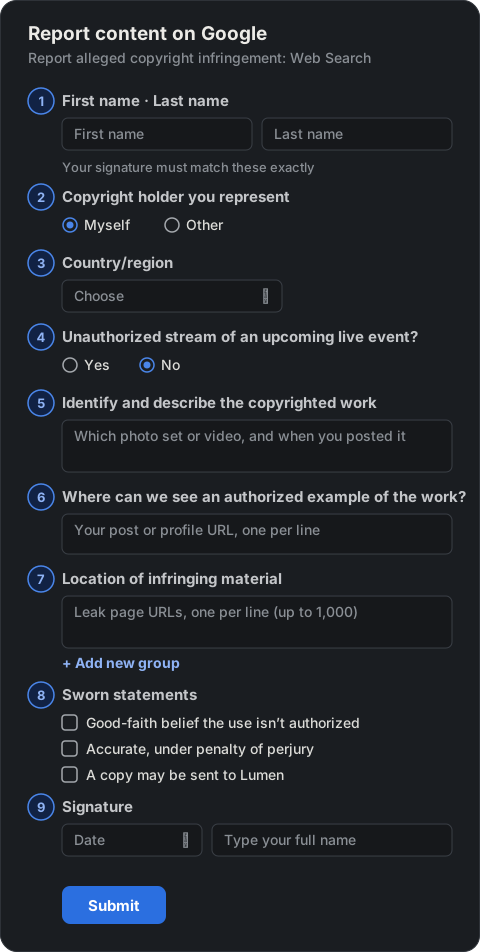
- Both answers open the same form, Report content on Google, headed "Report alleged copyright infringement: Web Search." Google also links to this form from its personal sexual content page. Sign in with a Google account or verify an email address first. Google sends its replies to that address.
- Fill in the form:
- First name and Last name. Your signature at the end must match them exactly. Fill in Company Name only if your employer is filing as the owner's representative.
- Copyright holder you represent: choose Myself, or Other if you represent someone.
- Country/region.
- Is the submission related to an unauthorized stream of an upcoming live-event? Answer No.
- Identify and describe the copyrighted work. One work per group.
- Where can we see an authorized example of the work? One URL per line.
- Location of infringing material. The leak page URLs, one per line, up to 1,000. Use Add new group to report another work in the same notice.
- Sworn statements. Three checkboxes: a good-faith belief that the use isn't authorized, a statement under penalty of perjury that the notice is accurate and that you are the owner or authorized to act for them, and an acknowledgment that a copy may be sent to Lumen.
- Signature. Pick the date and type your full name.
- Click Submit. Watch your inbox, because Google may ask follow-up questions if the notice is incomplete.
Your name and the Lumen database
Google may forward copyright notices to Lumen, a research project at Harvard's Berkman Klein Center that publishes takedown requests. Google generally shares the name of the person who made the request, the rights holder's name and the reported URLs. Google "never shares with Lumen any information provided in the contact information fields," such as your email address.
The form's Lumen checkbox reads that Lumen "redacts personal contact information from notices before publication, but in many cases, will not redact my name." Plan as if your name will be published.
In Google Search, a notice may appear at the bottom of the results page with a link to the published request. A representative can file for you, but the rights holder's name is still among the details Google generally shares, so decide this before you file.
If the site files a counter-notice
The site's administrator or the person who posted the content can file a counter-notice. Google forwards a valid counter-notice to you and may put the result back. Its copyright FAQ says that if you don't send evidence of a court action or a Copyright Claims Board claim within 10 days, Google may reinstate the material.
Route 2: Request removal under Google's personal sexual content policy
Use this route if you didn't consent to the imagery or the act, or if the content is fake. Paid content you agreed to make doesn't qualify just because someone reposted it without permission. Use the copyright route for that.
- Check the conditions on Google's Remove personal sexual content from Google Search page.
- Open the Report a problem form, "Request personal content removal from Google Search."
- Choose Content contains nudity or sexual material and your country of residence. Depending on your country, the form may send you to a country-specific version.
- Provide the URLs and screenshots. Google says you can edit screenshots so only your face shows.
Google reviews only the URLs you submit, but for sexual imagery it does its "best to find and remove duplicates from Google Search."
What a Google removal can't do
- The file stays online. In Google's words: "Even if Google takes the website or picture off from our search result, the page is still there." Anyone with the link can still open it.
- It works one URL at a time. A copyright notice must name each specific URL. A page you didn't list stays in the results.
- Reuploads need new requests. The same video at a new address or on a mirror site is a new page and needs its own request.
- Other search engines are separate. Each has its own removal process.
Remove it at the source: send a DMCA notice to the host
Google can hide the result. Only the site or its host can delete the file. Here's how to find who to contact.
- Check the site itself. Look for a contact, DMCA or abuse page. Google suggests starting with the site owner, "because they can take the page down."
- Look up the domain. Use ICANN Lookup, ICANN's registration data tool. It runs on RDAP, which replaced WHOIS as the definitive source for generic domains in January 2025. Results show the registrar and the registrar's abuse email and phone. The owner's own details may be redacted. Many country-code domains work too, such as .to and .cc. For country-code domains without RDAP, such as .io, the tool offers an older WHOIS lookup instead.
- Find the hosting provider. Look up the site's IP address in a regional internet registry's RDAP service, such as ARIN's. The result names the network owner, often the hosting company, and usually an abuse contact.
- Check for a proxy. If the lookup points to a proxy or CDN such as Cloudflare instead of a host, report through that company's abuse form. Cloudflare says it "shares copyright infringement complaints with the relevant hosting providers and website operators."
- Send the notice. A DMCA notice to a host needs the same core elements as your Google notice: your signature, identification of your work, identification of the infringing material and where it is, your contact details, a good-faith statement, and an accuracy statement under penalty of perjury (17 U.S.C. § 512(c)(3)).
Some hosts act on notices and some ignore them. The DMCA is a US law, and hosts based elsewhere may not follow it. When the source won't act, the Google removal still takes the page out of the results people see when they search your name.
When doing this by hand stops working
This works for a handful of links. It gets hard to keep up with when the same set shows up on many mirror sites, removed files come back at new addresses, and you're tracking which notices went to Google, which went to hosts, and who answered.
If you keep going by hand, log the URL, the date you found it, the date you reported it to Google, the host you notified, and the result.